


Excerpt Contents: Do you want to know more about automating Tosca? Tosca is a model-based test automation tool that helps people make automatic test scripts for various software programs. We will learn about the different automation tools in Tosca in this lesson. Let’s check out Tosca right away.
Do you want to know about Tosca? Tosca can automate regression and functional testing because it is a test tool. Mobile and API testing is currently essential for AGILE product delivery and are also within its capabilities. Automating any scenario in Tosca does not necessitate scripts or coding because it offers script-less automation. Therefore, creating test cases is a breeze once you master the tool. TOSCA aids its users in methodologically creating efficient test cases and providing management with comprehensive reports.
Tosca:
Tosca is a test automation platform providing users with a vast collection of tools for evaluating applications and services on many devices.
Offer a unified method for automating tests by providing tools for creating and running test cases and virtualizing services.
Compared to more conventional manual methods, Tosca’s streamlined test automation scenarios allow for the reliable and fast testing of end-to-end business processes.
These scenarios, available in the Tosca documentation, enable firms to swiftly adjust to changing market demands and maximise their investments in test automation technologies.
The developers of the Tosca platform for software testing were Trecentist, an industry-leading supplier of solutions for automating software tests.
Why is the Tosca Tool useful?
Every form of automation is recognised to have its own set of pros and cons. This is why testers must look into several tools to discover the one that suits them best. Because of its adaptability to enterprise-level applications, Tosca is a great choice for large-scale projects.
Among the many excellent and widely used automated testing tools, Tosca stands out. To get good results, it’s employed a lot in big applications. Because of its intuitive interface, Tosca is the tool of choice for testers in the automotive, metal and mining, financial, and educational sectors. Learn more about it in Tosca Training.
What the Tosca Testsuite Can Do:
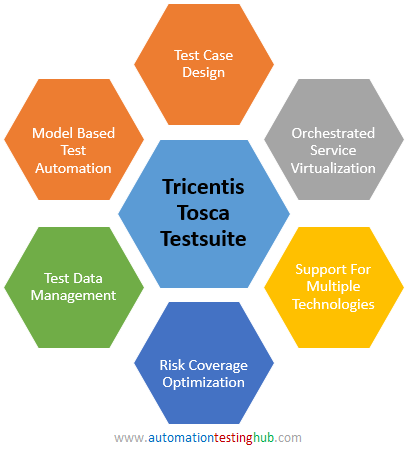
Here is a comprehensive list of all the capabilities of the Tosca automation tool. Among them are:
- Vision AI:
Vision, the next generation of artificial intelligence (AI), “sees” people, making it possible to automate testing for programs operating on remote PCs quickly.
- Automated model testing:
Automate your tests without writing a word of code using a revolutionary strategy that decouples application technical concerns from the automation model. This will increase automation by 90%, lower maintenance costs, and raise productivity.
- Maximising test outcomes with risk analysis:
Risk-based testing reduces automation suite tests and improves software release safety. This information can help you make better “go/no-go” release decisions, lower test creation and maintenance costs, and prioritise mission-critical functionality.
- Virtual Service Management:
Service virtualization eliminates the agony of testing answers from unbuilt or hard-to-access systems. This eliminates a key testing bottleneck, allowing automated tests whenever needed.
- Test data management:
Another danger that delays software testing is test data corruption. Even in the most intricate cases, test data management allows you to generate and transmit stateful data as needed.
- Decentralised processing:
Execute many tests simultaneously using virtual machines and distributed infrastructures to test more efficiently.
- Checking the API:
A codeless technique could simplify API testing by increasing test stability and speeding up the process.
- Recording assistance for automation:
Giving business users a simple way to document their routine tasks might help them avoid manual testing by creating automated test cases.
- Evaluation on mobile devices:
Efficiently create and utilise mobile tests as the foundation for comprehensive test scenarios on iOS and Android devices through native, hybrid, or mobile websites.
Does the Tosca Automation tool have an open-source component?
Because of its features and options, Tosca is frequently compared to Selenium. Every tester needs to be aware of the true distinctions between various tools. If you know the exact difference, you can use it to filter out the wrong tool now and then. The Tosca automation tool is an affordable paid tool compared to others on the market. The majority of today’s testers would gladly pay a nominal fee to have their time and energy saved. It is the linear expansion or LinearQ (SM) methodology that the tool is built on. It follows that many users find the premium tool to be the most effective.
Pros of the Tosca Automation Platform
Here are some Pros of the Tosca Automation Platform
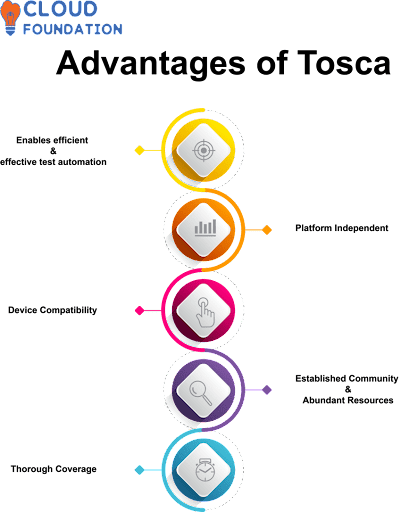
- Various functions in a single instrument:
The need for testers and testing procedures is high for apparent reasons. People should consider employing a tool that has several possibilities for them to choose from. Due to its extensive features, Tosca ranks among the top agile test management tools.
Most testers favour employing a multi-purpose tool to cut down on wasted time and energy. This product has plenty of space for the test management and automation tools to coexist.
- Programming Not Necessary:
When evaluating different applications, modern-day testers would rather use something other than scripting. The procedure can run smoothly with the help of any automation technologies now on the market. Tosca is an automation solution with a great risk coverage tool that makes improving processes and user effort easier.
Tosca is a fantastic program that provides the possibility to play without coding. People use it more frequently and more efficiently since scripting is not required.
- Methodology for Testing:
Several factors are known to be evaluated before beginning the testing process. Since it has such a significant impact on the final product, testing methodology is a key element. To better serve both large- and small-scale applications, Tosca employs the Agile test approach.
These days, most testers would rather engage in continuous testing operations. The application can only operate well if the process is both comprehensive and ongoing. Everyone says that finding test data is the best way to maximise efficiency.
- Works with a variety of technologies:
The most widely used technologies are only sometimes applicable. Technology trends is constantly improving to make things easier and more user-friendly.
There has been a tremendous amount of progress in contemporary technology. Some apps clearly use scripting languages that are both very advanced and old-fashioned. A good tester should be well-versed in a variety of technologies. They can get the data readily because they know multiple technologies.
The Tosca automation tool is compatible with many popular technologies, including ERP, JAVA, SOA, HTML, SAP, etc. Because of this, testers may easily take advantage of the tool’s features.
- Support from Reliable Vendors:
Before utilising the tool, vendor assistance is essential for all testers. Regularly, not all automation tools have user-friendly alternatives. Regarding vendor support, Tosca is right up there with the best of them.
Modern testers tend to favour paid tools with good vendor support, whether free or not. Users are strongly encouraged to consider purchasing a tool at an affordable price since it offers features and support alternatives.
Since Tosca is a premium tool, they can afford to offer testing support. Their high-quality vendor assistance has allowed them to attract a large audience for reasons that should be readily apparent.
- A user-friendly interface:
Before utilising an automation solution, it is crucial to think about the interface. These days, it’s hard to find a tool that doesn’t have an appealing user interface. Users are strongly encouraged to think about selecting a tool with practical alternatives.
Try out a few different apps because there are a lot of tools out there. Many people are interested in the Tosca automation tool because of its user-friendly design and practical capabilities.
- Value for Money:
Cost is a major consideration for all testers worldwide. To get you started, the market is rife with free tools. The user must be well-versed in the features before settling on an automation solution.
Among the many popular tools, Tosca has attracted the interest of testers all across the globe. You won’t get this gadget for free, but it’s not expensive either. Every tester should know how long it takes to use the tool and what results it produces. Both novices and seasoned pros use Tosca because of its abundance of useful alternatives.
The tools are affordable without sacrificing quality, encouraging consumers to purchase them.
- Ongoing Information:
Due to the high demand, technology is advancing rapidly. You should choose a technology that provides updates quickly to meet your needs.
Due to its adaptability, the Tosca automation tool ranks among the top functional testing automation solutions. Tricentis is a well-respected company that provides first-rate tool updates to guarantee uninterrupted access.
Thanks to the tool’s constant improvements, many options are available for testing based on needs.
- Easy Outcome:
Having a tool recognised to save time when used regularly is vital. The market offers a diverse selection of automated testing tools. So, to get fast and good results, you need to choose the correct UI testing tool.
For many reasons, the Tosca testing method is in high demand. In a short amount of time, just a handful of quality test automation solutions guarantee to provide the correct outcome.
Every tool yield outcome; that much is clear. However, only a well-respected instrument guarantees rapid, high-quality products.
- Work well with extensive operations:
Tools for both large-scale and small-scale operations are readily available. To save time and effort, it is crucial to determine the optimal selection of testing automation tools.
In recent months, the adaptability of the Tosca automation tool has led to its meteoric popularity. Every tester will find the tool valuable because it supports small and large-scale tasks.
Regarding testing companies and commercial organisations, Tosca is the tool of choice. In software testing, it is one of the most remarkable techniques for finding results quickly.
Tosca Commander
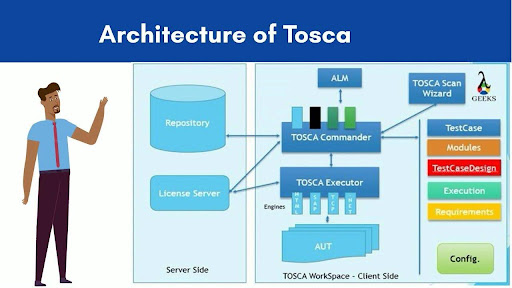
Tricentis Tosca Automation tool primarily consists of the Tosca commander. In terms of test automation, it can handle all that needs doing. There are five main parts to it –
-
- Module Components – All the modules, standard and user-defined, needed to construct the automated test cases are in this section.
- Part of the Testcase – Here, you can find the technical parts of the test cases.
- The section on Test Case Design – This is where the test cases keep their dynamic test data.
- Section for Execution – This part is responsible for running all the tests using execution lists. This is where detailed logs are stored after the execution.
- The section on Requirements – Here, you may find all the information about the requirements.
The Tosca Commander is primarily responsible for the following tasks:
- Management of users in Tosca
- Generate modules by scanning apps.
- Build an archive
- Make a sample test.
- Using TCP, TCD, TDM, and TDS to parameterize test data
- Testing case upkeep
- Conducting the test
Workspace by Tosca
Every user has access to the same Tosca workspace, where they can develop tests, maintain them, execute them, and do anything else with Tosca test automation. You can build a workspace on your local drive. However, it is also possible to create it in a central repository, such as a shared network drive or many databases, depending on the organisation’s needs. Every workstation should be reserved for a single user at a time.
The ideal location for a multiuser environment’s workspace is one all users can easily access from the centre.
A single user has access to a single user’s workspace. Therefore, data and source management are unnecessary.
By centralising all project data in a single area, the Multiuser Workspace makes data administration easier. To prevent data loss in a multiuser workspace, users must check out (lock) all components before making any changes. The user must check in (unlock) the details after the update is complete to save them to the common repository, which any other user can access.
Automation by Tosca
To grasp the big picture of Tosca Automation, you need to study the following subjects.
Sections of Tosca:
Tosca modules store the control technological details. Using the technical data to guide the test items is the point.
Scan the application and construct the modules as a first step in developing the test cases in Tosca. Every page and screen of the test app needs to have its necessary controls scanned and created as a module. Every test object on application screens and pages is considered a “control” in Tosca. Module attributes must include the controls needed for test execution.
In Tricentis Tosca, you may choose between two different kinds of modules. Here they are –
The Original Modules –It guides the test objects with the help of vintage engines.
The XModules framework – Instead, it makes use of Tosca XEngines, which are built on the TBox framework.
Tosca Test Case:
One way to ensure that an application works as expected is to create a set of test cases, logical steps or blocks of instructions. Manual or automatic execution of the test case is possible. This page will provide information regarding the automated test cases for Tosca. Standard and user-defined modules with verification points make up the Tosca Test Case.
The Tosca Test Cases Classification System:
- Technical Test Cases
- Business Test Case
- Technical Test Cases:
To validate the test scenarios, these are the actual Test Cases. To create it, go to the Test Cases section, right-click on any folder, and then choose the blue circle arrow icon. Using the shortcut keys “Ctrl+N” and “Ctrl+T,” you may quickly construct test cases in Tosca.
Inserting or dragging and dropping modules into Test Cases creates test steps. Here, test steps result from including modules with data and actions in the test case. Once you’ve made your module or test step selection in the left panel, the details section appears on the right side. The following operations are compatible with Tosca Test Cases:
- The If-Else Statement
- Condition
- Statements That Loop
- Storage
- Business Test Case:
Functional coverage is defined by creating logical groups using Business Test Cases. An organization’s test cases are a collection of technical test cases. Direct execution is not an option for us. Its sole purpose is to track the testing cycle’s functional coverage.
Parameters for Tosca:
One way to include test data in the Test Cases is by parameterization, which involves using variables or parameters. Buffer and test setup parameters are some topics covered in this article.
Buffer –
Tosca allows us to think of variables as Buffers where you can store data. Only the current workspace is visible in the buffer scope. Not updating the buffer values to the shared repository prevents other test systems from accessing the buffer.
Parameters for the Test’s Configuration –
You can define Test Configuration Parameters (TCP) in the Test Case folder, in the Test Case itself, or at the execution list level. All child folders and test cases can access TCPs set at the folder level. To access the value, the syntax for TCP is {CP[<logical name>]}. A test case, folder, or execution list’s Test Configuration section allows us to create, edit, or inspect the TCPs.
Test configuration parameters (TCPs) are the best place to store configuration or test environment data that is unique for whole test suites. Recommended TCP parameters include program paths, URLs, environment names, user information, reporting approaches, etc.
Library of Tosca:
Block of Test Steps:
It is a set of test procedures needed to automate some minor features. What they mean by “function” or “method” is conceptually identical. Folders at the Test Case level facilitate the logical grouping. Improving the readability and comprehension of Test Cases is the main goal of building a test step block.
Invoking the browser, entering the credentials, and verifying the login are all phases of the application login process. In this specific situation, we’ll need to make a folder inside the test case to serve as a test step block. Subsequently, we will establish three stages and change its name to ApplicationLogin.
Resource for Testing:
Here, they can design the parts of their test steps to reuse. You can use any folders in the Test Cases section to create the library. Developing several libraries inside a root folder is impossible due to certain limitations.
Building a Library:
Select the “create test step library” folder icon (L symbol) from the context menu when right-clicking any folder in the TestCase section. Pressing “Ctrl+N” and “Ctrl+L” together will create a library folder.
The Tosca Execution:
After we’ve made their test cases in Tosca Commander’s TestCases section, you can execute them using one of these methods:
- Tosca ScratchBook execution
- Tosca ExecutionList runs the execution.
Code snippet for Scratch:
When creating or maintaining tests, running them in ScratchBook is best to ensure they’re comprehensive. Since the execution log entered into the sketchbook is temporary, it will not be usable. It is also possible to conduct certain TestSteps by drilling down.
Programme Runtime in ExecutionList:
Specific ExecutionListes are required to carry out the test execution cycle. You can refer back to the result logs created in ExecutionList at a later time. The common repository stores these logs. For continuous testing, you can connect the execution list to an external system.
Conclusion:
Automation tools are the preferred choice of every software and application tester for several reasons. The sophisticated capabilities of most automation systems have earned them a reputation for reducing manual labour requirements. Regarding software testing, Tosca is a desirable automation tool with a test suite. Occasionally, users can use enhanced capabilities thanks to the remarkable feature. It provides testing services on various platforms at an affordable price. For efficient and high-quality results, testers often turn to Tosca, one of the most popular tools in their toolbox.
